Quick Reference
- Check customer status in Freshdesk.
- Accepted? → Mark in Excel and move on.
- Not accepted? → Call customer.
- Ask if the email was received.
- If received, check for link issues.
- If not received, confirm email address for resending.
- Transfer questions to Jean or Patrick when necessary.
- Record all actions and outcomes in Excel.
- Proceed to the next customer.
Step 1: Open the Excel List
Open the assigned Excel file containing the customer list in MS Teams under the folder "T&C - New Terms and Conditions".
Work through the list one customer at a time.
Step 2: Check Customer Status in Freshdesk
Search for the customer FLO ID in Freshdesk.
Check if in the list there is a ticket called "New submission from FLOCERT Terms and Conditions for Certification Services"
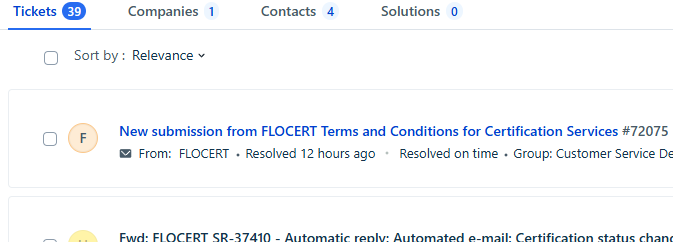
!Any other ticket type is not relevant! If there is no ticket with title "New submission from FLOCERT Terms and Conditions for Certification Services", the customer MUST be called and NO indication should be made in the Excel list.
Verify whether the FLO ID indeed matches by opening the ticket and checking the field "FLO ID of company".
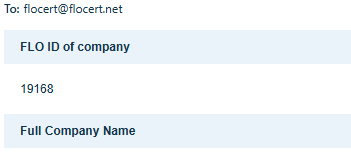
If the customer has accepted:
- Mark the customer as Accepted in the Excel file.
- Record the ticket number.
- Proceed to the next customer.
If the customer has not accepted:
- Continue with the steps below.
Step 3: Contact the Customer
Ask the customer whether they have received the email regarding the new Terms & Conditions (see Call script further below).
Scenario A: Customer Received the Email
- Confirm that the customer received the email.
- Ask whether they experienced any issues accessing or using the acceptance link.
If there are no issues:
- Encourage the customer to review and accept the Terms & Conditions.
- Document the discussion in Excel.
If there are issues with the link:
- Record the issue in Excel.
- If additional support is required, transfer the call to Jean or Patrick.
Scenario B: Customer Did Not Receive the Email
- Confirm the correct email address with the customer - Primary Contact in Intact.
- Ask which email address should be used for resending the communication.
- Record the confirmed email address in Excel.
- Arrange for the email to be resent according to the standard process. Mailings in the five languages are on MS Teams.
Step 4: Handle Customer Questions
If the customer has questions:
- Transfer the call to Jean or Patrick for further assistance.
- Note the transfer and reason in Excel.
Step 5: Document the Outcome
For every customer contact, update the Excel file with:
- Acceptance status
- Call outcome
- Whether the email was received
- Any issues reported with the link
- Updated email address (if applicable)
- Any transfer to Jean or Patrick
- Additional comments or actions required
Step 6: Continue with the Next Customer
- Save your updates in Excel.
- Move to the next customer on the list and repeat the process.
Call Script – Terms & Conditions Follow-Up
Opening
Good morning/afternoon, may I please speak with [Customer Name]?
My name is [Your Name], and I'm calling from FLOCERT regarding our updated Terms & Conditions.
Do you have a few minutes to discuss this?
Verify Status
I am contacting you because our records show that the updated Terms & Conditions have not yet been accepted.
I would like to check whether you received the email containing the acceptance link.
If the Customer Received the Email
Great, thank you.
Were you able to open the email and access the link without any issues?
If No Issues
Perfect. We kindly ask you to review and accept the Terms & Conditions at your earliest convenience.
Is there anything else I can help you with today?
Close the call:
Thank you for your time. Have a great day.
If There Are Issues with the Link
Thank you for letting me know.
Could you briefly describe the issue you are experiencing?
If the issue requires further assistance:
To ensure you receive the correct support, I will transfer you to Jean or Patrick, who can assist you further.
If the Customer Did Not Receive the Email
Thank you for letting me know.
Could you please confirm the email address where you would like us to resend the Terms & Conditions?
Wait for confirmation and repeat the address back:
Just to confirm, the email address is [email address]. Is that correct?
Thank you. We will arrange for the email to be resent to this address.
If the Customer Has Questions
I'd be happy to help. Could you tell me what your question is?
If you cannot answer the question:
To make sure you receive the most accurate information, I will transfer you to Jean or Patrick, who can assist you further.
Closing
Thank you for your time today.
We appreciate your cooperation. If you have any further questions, please don't hesitate to contact us.
Have a great day.
Notes to Record in Excel
After each call, update the Excel file with:
- Customer reached: Yes / No
- Terms & Conditions accepted: Yes / No
- Email received: Yes / No
- Link working: Yes / No
- Updated email address (if applicable)
- Customer questions raised
- Transferred to Jean or Patrick: Yes / No
- Additional comments or required follow-up
- Date of contact and your initials
Then proceed to the next customer on the list.
Was this article helpful?
That’s Great!
Thank you for your feedback
Sorry! We couldn't be helpful
Thank you for your feedback
Feedback sent
We appreciate your effort and will try to fix the article